
Kuca.ai
Loading
Bing Bing Bing
01Duo photo or up to two individual photos
Duo photo or up to two individual photos0/2
Aspect ratio
11s
100Credits
Remaining credits:
Public

Bing Bing Bing: your duo takes turns kicking at the camera

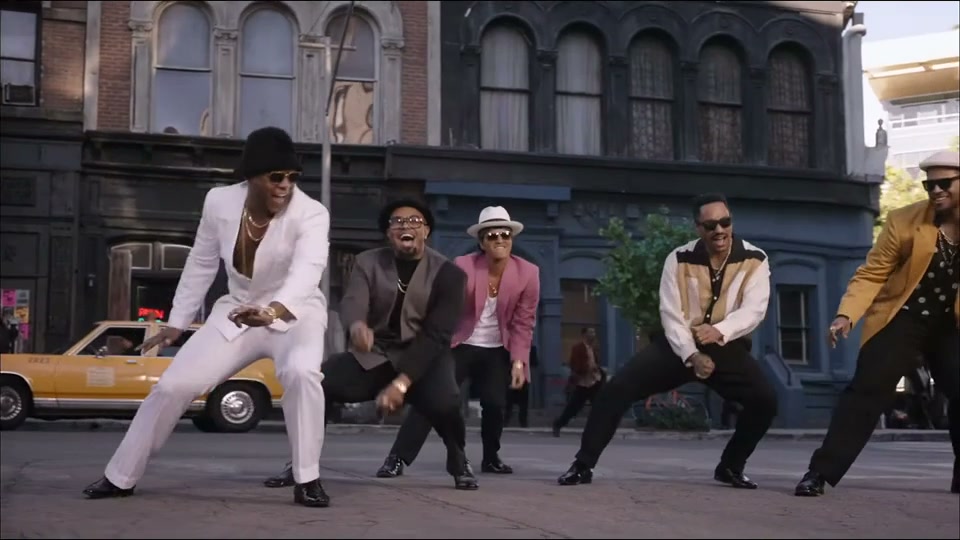
Bing Bing Bing is the camera-kicking meme where two characters stand together and take turns hopping toward the lens. AI versions give the same comic routine to birds, other animals and imaginary creatures. Upload your own people or pets above to make a kicking duo with recognizable faces.

How to make a Bing Bing Bing video

Choose the duo, keep the left-right roles clear and let the template handle the kicking routine.

  1. 1

    Choose who stands on each side

    Upload one photo containing both subjects, or add two separate photos in the upload area. In a shared photo, the subject on your left takes the left role. With separate images, photo one supplies the left performer and photo two supplies the right. With one solo photo, your subject appears on the left and the other side keeps the template character.

  2. 2

    Watch the alternating kicks

    The routine has two performers take turns kicking toward the camera at the roadside. Each approaches the camera, lifts a foot and moves back while its companion waits for the next turn. The prepared prompt carries those actions into your cast. You can edit the instructions, but keep both roles clear if you want the same back-and-forth joke.

  3. 3

    Set the frame and clip length

    Start with 9:16 for a vertical post, or select 16:9 for a wider view. The default is 11 seconds at 720p; whole-second durations from 4 to 15 are available. Check the 100-credit cost and choose Public or Private according to your account access before you generate.

  4. 4

    Check the result before sharing

    Sign in and submit the video, then follow progress in Generation history. Watch both characters through their approaches to the lens, with sound on. Download the completed MP4 when you like the timing. If you want another attempt, Reuse parameters brings back the photos, prompt and settings.

What makes the Bing Bing Bing kicking meme work

The camera is part of the joke

These are exaggerated pretend kicks at the lens, rather than two characters fighting each other. The close approach makes a foot suddenly fill the picture, while the handheld camera reacts to the movement. Leave that simple setup intact before adding another action, a dramatic camera orbit or a complicated story.

Two turns make a little conversation

The pause between performers matters. One character kicks and returns, leaving a beat for the other to step forward. If both rush the lens together, the exchange becomes harder to read. Look for a clear handover from left to right instead of judging only the biggest foot in the opening frame.

The name follows the beat

Bing Bing Bing describes the punchy repeated rhythm people use to identify the meme. Searches for a bing bing bing song or bing bing bing sound effect can lead to several edits. Here, the selected street clip defines the action; the tool creates a video, not an isolated audio file or a song search result.

Different creatures keep the same situation

The examples show parrots, two furry monsters, and a hippo with a crocodile. Those changes work because the audience still recognizes the alternating approach and retreat. A surprising cast can be enough on its own. You do not need another location or a different camera move to give your duo a new personality.

Photos that make the two roles easy to recognize

01

A shared picture needs two readable faces

Choose a side-by-side photo with both subjects in focus and neither face hidden behind the other. Similar head sizes help the left-right assignment. Crop out extra people before uploading. A crowded group photo asks the model to guess which two subjects you intended, even if everyone happens to be looking at the camera.

02

Two portraits do not need a collage

Use one intended person or pet per separate image, then check their order in the upload preview. Matching image styles and reasonably similar lighting give the pair a coherent starting point. You can use photos taken in different places because the generated street comes from the template, rather than either photograph’s original background.

03

Give the kick a believable body

A full-body or knee-up image can supply useful clothing, leg and shoe details. A clear portrait still provides an identity, but the model must invent more of the body. Avoid a phone across the face, heavy beauty smoothing and an extreme camera angle if your priority is recognizing a familiar person during a fast approach.

04

Pets keep their own animal features

For a pet, show the face, markings and as much of the body as possible. The instructions keep its species and natural paws or feet while adapting the upright comic motion. People are requested as people, rather than faces pasted onto birds. Review legs and joints carefully; a clear input does not guarantee perfect anatomy.

Three takes on the camera-kicking routine

Parrots, furry monsters and a hippo with a crocodile show three ways to cast the same camera-kicking joke. The parrot version also plays beside the tool.

TikTok · @jakeyang04

Two parrots take their turns

One bird comes close to the lens while its partner waits behind, then they trade places. The unusual cast makes the familiar kicking routine feel new, while the street and handheld viewpoint keep the joke easy to recognize. This is an AI remix shown for inspiration. Your uploaded people or pets follow the kicking choreography from the template, keeping their own appearance instead of inheriting the birds’ bodies.

Generate video
TikTok · @jakeyang04

Two furry street monsters

With shaggy bodies and bright eyes, this version shows how a very different cast can carry the same routine. Watch the character waiting behind as the other comes forward: that pause helps the audience follow whose turn it is. For your own pair, choose photos where each subject has a distinct face or markings. This is another AI interpretation of the kicking routine.

Generate video
TikTok · @shinxe2001

Hippo meets crocodile

A hippo and a crocodile turn the same back-and-forth into a mismatched double act. Their contrasting shapes keep the two roles easy to follow, even when one moves close to the camera. Try a duo with recognizably different appearances and check that neither loses its identity during the kick. This is another take on the meme.

Generate video

Choose the frame and timing

9:16 for phone screens

Start with the default vertical frame. Keep both characters and their feet visible, and leave the path toward the lens clear. Check the result at phone size before sharing.

16:9 for a wider view

Choose landscape before generating for a wider composition. The model rearranges the scene; this is a new generation, rather than a crop of an existing video.

11 seconds to take turns

The default gives both performers time to approach, kick and step back. You can choose 4–15 seconds; keep the action simpler for shorter clips.

Add your caption afterwards

The prepared prompt asks for no added captions or logos. Add your own text after downloading, away from faces and feet so the joke stays visible.

Sound and prompt changes for your own version

01

Audio is generated with the scene

Sound is enabled for this effect, and the instructions ask the model to follow the reference’s rhythm. That is not a promise of a bit-for-bit copy of its soundtrack. Listen to the finished result: a new sound, a different emphasis or imperfect synchronization can occur even when the visual sequence follows the example.

02

Keep the exact song for the posting app

If you want a particular bing bing bing bong song TikTok edit, use the audio choices available when you publish. Match the kicks to the beat you select and avoid layering two loud tracks together. Downloading a video and choosing a platform sound are separate steps; the form does not search the platform’s music library for you.

03

Edit one instruction at a time

You can change the mood, clothing emphasis or closing expression in the prompt. Keep Image 1 and Image 2 assigned to their own sides when using two images. Reversing those assignments while also changing the camera and the action makes it difficult to tell why the result changed. Save a useful take before starting another comparison.

04

Watch the return as well as the kick

The model has to keep each character consistent when it moves forward, passes close to the camera and returns beside its companion. A sharp first frame alone cannot show that continuity. Scrub through the whole result, paying attention to the second performer, and listen for whether the turn-taking still reads as a single playful exchange.

Credits, visibility and completed downloads

  • Generation costs 100 credits

    Watching the source clips and preparing your photos does not spend generation credits. Submitting this effect costs 100 credits. A task marked failed returns the charged credits; a completed result that you want to revise is another generation with another charge. Check the uploaded images and their order before pressing the generation button.

  • Choose who can see the result

    Public is used for free-account generations. Paid access enables Private and downloads without Kuca’s added watermark. Set visibility before submitting and use photos you are allowed to upload. Private controls publication on Kuca; handle the downloaded file and any direct links according to the audience you actually want to share them with.

A quick review before sending the kicking duo

  • Follow both identities through the close-ups

    Check the left character at the start, near the lens and after stepping back, then repeat the check for the right character. Watch for swapped faces, blended markings or human hands appearing on a pet. Also check that the framing follows the movement without losing the waiting companion.

  • Keep a version you can return to

    Download the take you like before making another one. In Generation history, Reuse parameters restores the submitted photos, instructions and format so you can adjust a specific detail. Keep a short note about what you changed. Comparing the same cast with one different instruction is more useful than repeatedly changing every setting at once.

Questions about photos, sound and generation

Yes. With one solo photo, your subject appears on the left and the other side keeps the template character. For two personal identities, use a clear photo of both subjects or upload two separate images.


With separate uploads, the first image supplies the left performer and the second supplies the right. In a shared photo, the subject on your left maps to the left role. Check the thumbnail order before generating.


You can try two clear pet photos, or one photo showing both animals. Their species, markings and paws or feet are requested alongside the upright kicking motion. Review body proportions and leg movement in the completed clip.


Sound is generated with the video, with instructions to follow the reference rhythm. The result can differ from the source audio. Add a specific available platform track when posting if you need that exact edit.


It starts at 11 seconds, with choices from 4 to 15 whole seconds. Resolution is fixed at 720p. You can choose 9:16 or 16:9 before submitting.


Each submission costs 100 credits. A task marked failed returns that charge. A new attempt after a completed video is charged separately, even when you keep the same photos.


Paid access enables Private and downloading without Kuca’s added watermark. Choose the visibility before generating. You will find the completed result in Generation history.


Here it is the name used for the repeated-beat kicking meme. It describes the recognizable rhythm and alternating camera kicks, rather than a phrase you need to translate or place on the screen.