
Kuca.ai
Loading
Gangnam Style AI Video
01Middle person
Middle person0/1
Add friends on either side (optional)
02Viewer-left person · optional
Viewer-left person · optional0/1
03Viewer-right person · optional
Viewer-right person · optional0/1
Aspect ratio
Duration21.6s
200Credits
Remaining credits:
Public

Gangnam Style AI Video: your friends take the camera

This Gangnam Style AI Video puts your photos into the complete three-person street selfie by @emiliyyam, set to PSY’s song. Friends share the frame, take turns close to the phone, then reunite at the end. The full reference beside the form shows the sequence of about 22 seconds. Start with one portrait for the middle person and optionally add friends on either side. One finished 720p MP4 costs 200 credits.

Make your Gangnam Style AI Video from photos

You choose the cast. The street performance and reference video are already prepared.

  1. 1

    Choose the middle person

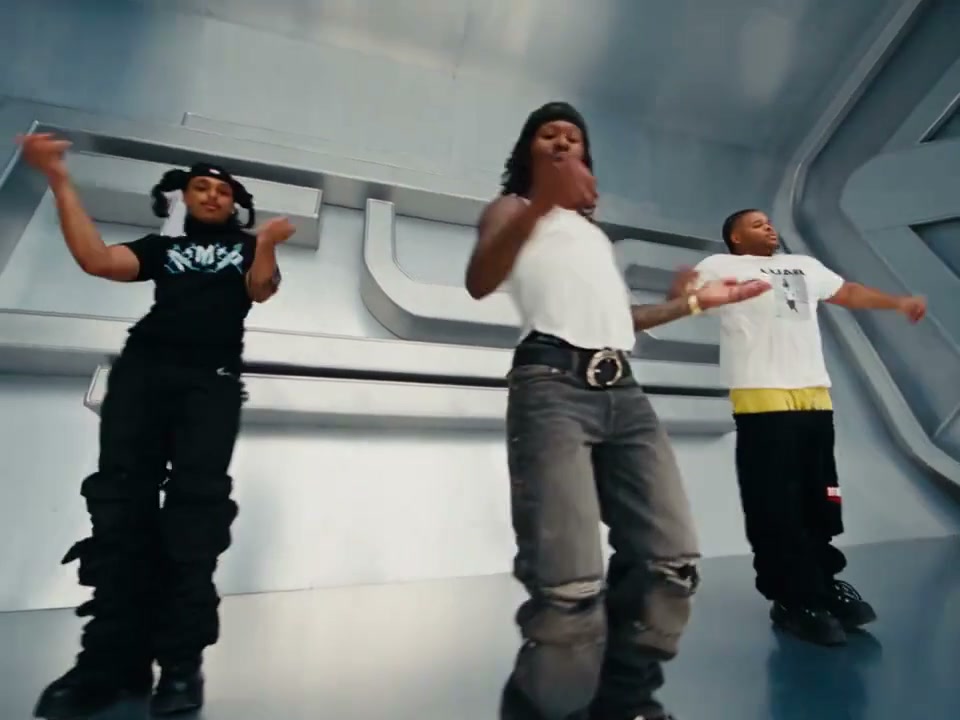
    Upload one clear portrait in the first slot. It replaces the person with wavy dark hair and a black top in the opening group shot. This assignment follows that same person into her close-ups rather than switching whenever someone else moves into the middle of the screen.

  2. 2

    Add friends if you want

    Open the optional slots for viewer left and viewer right. In the opening shot, the left person wears a black jacket and the right person wears a white blouse. Fill either side independently; leaving a slot empty preserves the person already in the reference.

  3. 3

    Check the format and cost

    This template keeps the full sequence at about 22 seconds. Landscape 16:9 matches the reference; vertical 9:16 is also available. Resolution stays at 720p and the complete video costs 200 credits with one, two or three portraits.

  4. 4

    Generate and review the movement

    Sign in, check your credit balance and submit. Generation history shows progress and the finished MP4. Watch each camera handoff with sound before downloading. A good opening frame alone does not show whether the faces remain consistent through the close-ups.

A street selfie with individual camera turns

The newer trio format

PSY’s song is familiar, but this reference uses a different visual joke from a full-body horse-riding dance. Three friends react to one phone and lean into individual close-ups. The recognizable part is their changing distance from the lens and the shared street setting.

The post behind this reference

The selected footage is from @emiliyyam’s TikTok post captioned “gangnam style in gangnam”. The night street, building frontage and Korean flags are part of the original scene. The examples also include independent AI remixes, so you can compare the original performance with recast versions.

The opening, the camera turns and the reunion

The full performance runs from the first shared selfie through the solo camera turns to the final group moment. Watch the reference beside the form to see who appears when.

Identities follow people, not screen coordinates

Middle, left and right identify people in the opening group shot. Once the phone moves, those people may occupy a different part of the screen. Your photo must stay with its assigned performer through those changes, while the street and the other people stay recognizable.

Photos that survive a very close camera

01

Keep the face readable

Choose an evenly lit portrait with visible eyes, hairline and the outline of the face. The camera comes close in this effect, so a tiny face inside a distant landscape is less useful. Strong beauty filters and large sunglasses can hide details the model needs.

02

Separate friends before uploading

Each slot expects one intended subject. If your best picture is a group selfie, crop three separate portraits from it before assigning the roles. Avoid leaving a second large face beside the chosen person; a slot is an identity reference, not an instruction to add another companion.

03

You do not need to pose or dance

A normal photo is enough to supply appearance. The uploaded image’s room and posture are not the new setting or choreography. Choose clothing and a hairstyle you want to recognize in the remix, then let the prepared video guide the gestures and phone movement.

04

Phone uploads and file limits

Sign in before uploading. JPG, PNG and WebP work directly, and supported HEIC or HEIF phone photos are converted to JPEG during upload. Keep each photo within 20 MB. The phone-upload option can bring a picture from your handset without emailing it to yourself.

Compare the street original and two AI remixes

Watch @emiliyyam’s full street selfie, then compare two creator remixes with different people and cats. The source links sit beneath each video.

TikTok · @emiliyyam

@emiliyyam: the street reference

The complete reference opens with black clothing on viewer left and in the middle, and a white blouse on viewer right. Each person gets a camera turn before the final reunion.

Generate video
TikTok · @mxna.mxna

A different trio at sunset

@mxna.mxna recasts the street selfie with a different group and warmer evening light. Compare the individual approaches to the phone with the original, especially the short-haired middle performer and the person wearing a cap.

Generate video

Keep enough room for the friends beside you

Landscape is selected first

The clip is 16:9, so landscape gives the trio room to share the selfie. Start here if the group opening and everyone’s gestures matter to your post.

Vertical changes the composition

Choose 9:16 for a tall social edit, knowing that a narrow output may reframe the wide scene. The people beside the middle performer are particularly easy to lose at the edges. Check their individual turns as well as the group opening before using that version.

One complete performance

The video lasts about 22 seconds, with the opening, individual camera turns and reunion in one MP4. Pick your people and aspect ratio, then watch the full performance before downloading.

One price across the controls

One complete 720p video costs 200 credits. The charge is the same with one portrait or three and with either aspect ratio.

Listen to the result before choosing a soundtrack

01

The reference carries the song

Gangnam Style provides the sound for this street selfie. The video includes the reference audio, so you can hear the song while each friend approaches the phone.

02

Keep a copy before editing your post

You can prepare the clip without uploading a music file or choosing a track. Keep a copy of the downloaded MP4 before adding a caption or sound in a social app.

03

The examples are creator posts

The credited creator posts show the original selfie alongside two different casts. Compare the hair, outfits and expressions as each participant returns to the camera.

04

Posting has its own music choices

Use photos your friends have agreed to share, and choose music through the destination platform’s available options. If you add a track in a social app, preview the timing again with your caption in place.

Price, visibility and downloads

  • Generation is paid

    Each submitted generation costs 200 credits. Viewing examples and arranging photos do not spend generation credits. If a task is marked failed, the 200 credits return to your balance. A completed clip that you decide to change is a new generation with a new charge.

  • Choose visibility before submitting

    Free accounts generate publicly and their downloads carry Kuca’s watermark. Paid access enables Private and eligible downloads without our added mark. Private does not prevent access by someone who already has a direct file link. Watermark-free download does not erase marks already present in source footage.

Check every return to the camera

  • Review more than the poster

    Follow each assigned face from the opening group through the solo moments. Look for face blending, a friend receiving someone else’s identity, changed clothing or fingers that look unusual near the lens. A moving close-up can reveal problems that a still preview makes easy to miss.

  • Adjust one thing on a second attempt

    Use Reuse parameters in Generation history to bring back the assigned photos and aspect ratio. Confirm the restored slots before generating again.

Before you give the phone to your trio

Yes. The middle role is required; both side roles are optional. With one portrait, the two other people keep their original appearances. Kuca does not automatically copy you into the empty side slots.


This page uses the street-selfie format shown beside the form: friends share the frame and take turns close to the phone. Watch the reference to see the gestures, camera movement and ending before choosing your photos.


Yes. Middle refers to the opening group shot, not whoever is nearest the center of a later frame. The same photo should follow the wavy-haired performer in black through her close-ups.


Use one clear subject in each slot. Crop a group photo into separate portraits. Human portraits are the starting point for this performance; a pet photo is an experimental variation, like the cat remix shown among the examples.


Yes. The video lasts about 22 seconds and includes the opening, individual close-ups and final group reunion in one MP4. You can watch the full reference beside the form before choosing the people you want to feature.


No. Each video costs 200 credits at 720p. Preparing photos and watching examples do not use generation credits. The price stays the same for either aspect ratio and any number of filled roles.


A task marked failed returns its 200 credits. A completed video with an unwanted expression or imperfect face is different from a failed task. Creating an alternative version costs another 200 credits.


Free accounts generate publicly and receive Kuca-marked downloads. Paid access unlocks Private and eligible downloads without our added mark. A direct file URL can still be opened by anyone who has it; source marks are not removed.


The MP4 includes the audio from the full reference. Play it with sound before sharing, and check the expressions and gestures against the beat. If you add music in your posting app, preview that version as well.


Yes, 9:16 is available alongside the default 16:9. Vertical generation can reframe the wide trio. Check both side performers and choose an appropriate soundtrack in the posting app under its own music rules.