
Kuca.ai
Loading
Mi Chico Dance AI
01Leader
Leader0/1
Add up to four friends (optional)
02Blue beanie · optional
Blue beanie · optional0/1
03Black cap · optional
Black cap · optional0/1
04Sunglasses · optional
Sunglasses · optional0/1
05Graphic T-shirt · optional
Graphic T-shirt · optional0/1
Aspect ratio
15s
100Credits
Remaining credits:
Public

Mi Chico Dance AI: your friends in the rooftop routine

Five friends lean over a phone, the leader lifts it for a walking selfie, and the whole crew starts dancing above the city. Mi Chico Dance AI puts your chosen person or pet into that rooftop scene. Start with the leader’s photo and optionally replace the other four dancers.

How to make a Mi Chico Dance AI video

One photo starts the video. Add friends only for the parts you want to change.

  1. 1

    Choose the selfie leader

    Upload a clear individual photo in the first slot. It replaces the curly-haired performer in the patchwork jacket, including the ground-level huddle, close selfie and group routine. This role gets the closest view, so choose a portrait with visible eyes and a clear outline of the face.

  2. 2

    Give friends their own parts

    Open the four optional slots and match them to the original beanie, cap, sunglasses and graphic-shirt performers. You can fill any combination. A slot left empty keeps that original dancer throughout the clip; it never borrows a different friend’s photo.

  3. 3

    Check the frame and price

    Choose portrait 9:16 for a TikTok, Reel or Short, or landscape 16:9 for a horizontal edit. Videos come in 720p. Every request costs 100 credits, whether you replace just the leader or all five people.

  4. 4

    Play the result before downloading

    Sign in, generate and follow progress in Generation history. When it finishes, check the leader during the selfie and everyone during the dance. Listen with the volume on before downloading your MP4, especially if you plan to share the clip with the Mi Chico sound.

What makes this rooftop take recognizable

The phone comes first

The opening is part of the joke: five faces crowd over a phone lying on the ground, then one person brings it up into a selfie. A plain dancing portrait misses that setup. Here the same person should remain recognizable while the view changes from below the group to an arm’s-length selfie.

From selfie to full crew

The leader walks backwards with the other four friends behind. The camera then drops toward the dance formation, revealing the open rooftop parking area and evening light. The changing distance is why the effect uses a video reference instead of asking your photo to invent a new dance from a written description.

The song and the format

Mi Chico is associated with DJ Goja and the Jason Derulo and Melody version heard in many social clips. Different routines use that song. This page follows the five-person rooftop format specifically, rather than a solo studio lesson or any unrelated dance carrying the same hashtag.

Make the selfie the reveal

Choose the leader for the person your friends will recognize first. The shift from a face above the phone to a walking selfie gives that person a natural entrance before the group joins in. For a birthday message or a group-chat joke, let the face reveal carry the opening rather than covering it with a long caption.

Choose photos for faces that stay recognizable

01

Start with a straightforward portrait

Use even lighting and a face large enough to inspect without zooming. A front-facing or slight three-quarter view is useful because the leader approaches the lens. Avoid sunglasses, hands over the mouth, heavy beauty filters and screenshots where a tiny face is surrounded by text or app controls.

02

Show the outfit you want to use

An upper-body photo gives the model more information about appearance than a tightly cropped eye-level avatar. Your subject does not have to copy the dancer’s pose. Choose clothing and hair you want in the result; the rooftop setting and movement come from the video rather than your photo’s background.

03

Separate friends before uploading

Each role takes one image of one subject. If you only have a group photo, crop each person into an individual portrait first. Leave enough space around their head and shoulders. Check the optional slot labels again after uploading so two friends do not accidentally receive each other’s parts.

04

A pet can take a part too

For a cat or dog, use a clear view of its face, ears and coat rather than a distant action shot. The instructions ask for its own face, fur and paws while following the dancer’s movement. Treat it as a playful animal remix and inspect the moving limbs and face before sharing.

Watch the rooftop dance and other Mi Chico clips

The first video is the reference used here. Other clips show different takes on the same song and are credited to their creators; they are not Kuca-generated results.

TikTok · @jyt

The rooftop reference used by this generator

Five friends surround the phone, the patchwork-jacket leader films the selfie and the group starts the routine. This is the reference performance, not a Kuca-generated result.

Generate video
TikTok · @jyt

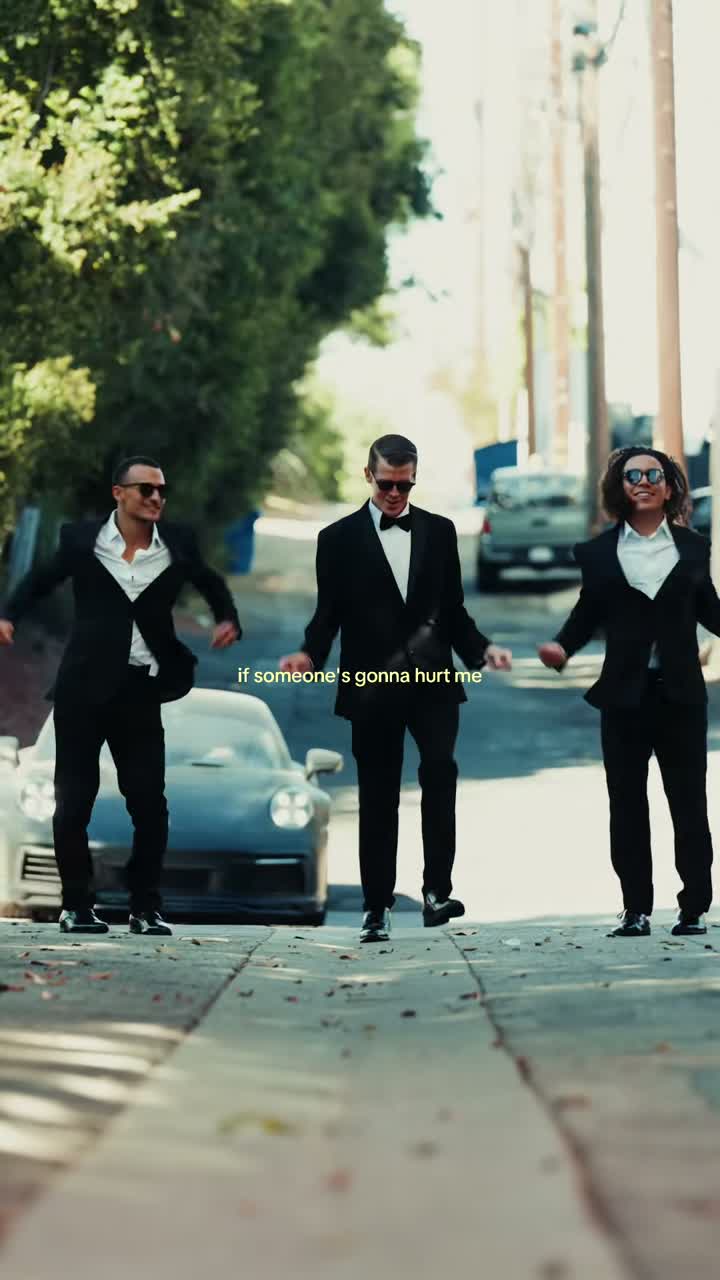
JYT performs the crew version in black

The @jyt group starts over the phone and moves into the rooftop dance in black outfits. Compare the selfie and the rotating formation with the selected reference. This is another real performance, not an output from your uploaded photos.

Generate video
TikTok · @mawt_4

Five cats take over the selfie

The @mawt_4 AI remix starts with cats looking down at the camera, then follows them into a group dance in a brick-lined alley. It is an independent creator’s animal interpretation with a different setting.

Generate video

Pick the output for where you will watch it

Portrait follows the original framing

The reference is vertical, so 9:16 is the natural starting point for a TikTok, Reel or Short. The ground-level faces, walking selfie and full-body formation were composed for that shape. Use it for a phone-screen version of the routine.

Landscape changes the composition

Choosing 16:9 asks for a wider result from a vertical scene. Review the opening huddle as well as the feet and outer dancers in the wide view. A landscape result is useful for a horizontal edit, but it changes the picture’s composition rather than revealing extra footage from outside the source.

Give the dance enough time

Let the selfie lead into the dance before deciding where to end your edit. A quick reaction and a clip showing the whole crew have different pacing. Watch your result through once, then choose a stopping point that feels natural with the music rather than cutting as someone starts a gesture.

An MP4 you can keep

Output is fixed at 720p and can be downloaded from Generation history. Save the original MP4 before adding captions in another editor. Keeping that clean copy makes it easier to create several social crops or adjust your caption without paying for another generation of the same cast.

Watch the dance with the sound on

01

No separate soundtrack upload

The chosen reference includes its own audio. The prepared instructions ask the model to keep that sound and the choreography together. You do not need to find a music file or upload an accompaniment, and selecting a different photo does not select a different song.

02

Listen during the transition

Play the selfie-to-dance transition with the volume up. The body movement, music and camera drop should feel like one moment. Listen for unexpected speech or a noticeable change in the track, and inspect the group’s arm movements on the beat rather than judging the video from its still cover.

03

Prepare captions after the preview

A short caption works best where it does not cover the faces at the start or the feet during the routine. If the joke is a friend taking over the selfie, let viewers see that face before text appears. You can add subtitles or a greeting in your own editing app after downloading.

04

Sharing on social platforms

Use photos you have permission to edit, and follow the destination platform’s music and AI-content rules. A generated MP4 does not itself provide music rights. Kuca gives you a download; you decide the caption, audience and account used to publish it on TikTok, Reels or Shorts.

Price, visibility and downloads

  • 100 credits for each generation

    This is a paid effect: every generation costs 100 credits. Watching the examples and preparing photos do not spend generation credits. A task marked failed returns its 100 credits to your balance. Changing a photo and generating a second completed version is a separate paid request.

  • Choose who sees the result

    Free-account generations are public. Paid access enables Private and eligible downloads without Kuca’s added watermark. Anyone with a direct file link can still open it. Check the visibility choice before submitting, especially when friends have agreed to a private experiment rather than a public post.

Check the crew before you share

  • Follow people, not positions

    Watch the first selfie, then follow the same people as the formation rotates. The beanie role should stay the beanie performer’s replacement even when that dancer crosses the frame. Check the outer dancers too: a convincing leader close-up alone is not enough to judge a five-person result.

  • Make one useful change at a time

    Use Reuse parameters in Generation history to restore your setup. A clearer leader portrait or a less cluttered pet photo is a useful single change for another attempt. Review every restored slot before generating, and keep a downloaded copy of the version you prefer so later experiments do not replace your favorite.

Before your first rooftop remix

Yes. The first photo replaces the leader in the patchwork jacket, including his walking selfie. Leave all four optional slots empty to keep those original dancers. You can also add just one or two friends without filling the entire crew.


No. Each slot takes one subject. Crop a group selfie into separate portraits and assign them to the roles you want. One image with several faces makes the intended identity unclear.


No. A generation costs 100 credits, with fixed 720p output. Looking at examples and choosing photos does not spend generation credits. The price is the same with one photo or five.


You can generate 4–15 whole seconds, with 15 seconds as the default. The reference uses the opening 14.8 seconds of the original take at normal speed, covering the phone huddle, walking selfie and group dance.


You can try a clear single-pet photo. The instructions preserve its face, fur and paws rather than giving it a human face. Check its movement and the selfie close-up before using the result.


The dancers change position, so choose by original clothing: blue beanie, black cap and hoodie, blond hair with sunglasses and hood, or cream T-shirt with a red print. These identities stay assigned as the camera and formation move.


A task marked failed returns 100 credits to your balance. A completed video that you decide to remake is a new request and costs another 100 credits.


The reference contains audio and the model is asked to keep it. Listen to the finished MP4 before sharing, including the selfie-to-dance transition. You do not upload a separate track.


Paid access enables Private and eligible downloads without Kuca’s added mark. Free-account generations are public. A direct file link can still be opened by its holder; removing Kuca’s mark does not remove marks already embedded in source footage.


Yes. JPG, PNG and WebP work, and supported HEIC/HEIF uploads are converted to JPEG. Keep each file within 20 MB. Download the MP4, then prepare your Reel under the platform’s music and AI-content rules.